> For the complete documentation index, see [llms.txt](https://planetary-defense-guide.gitbook.io/guide/llms.txt). Markdown versions of documentation pages are available by appending `.md` to page URLs; this page is available as [Markdown](https://planetary-defense-guide.gitbook.io/guide/discord-game/mint.md).
# Mint
Turn your Coins, Quantum Keys, Quantum Chests and Fragments into NFTs sent straight to your WAX wallet.
{% hint style="success" %}
The blockchain fees of these mints are covered by the game and cost only Coins.
{% endhint %}
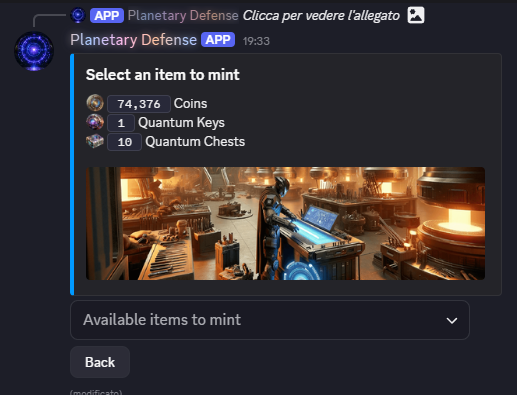
Selecting an item to mint shows a quick summary of what you currently have to work with — your Coins, Quantum Keys, and Quantum Chests. Each of these can be minted into its own NFT on the WAX blockchain.
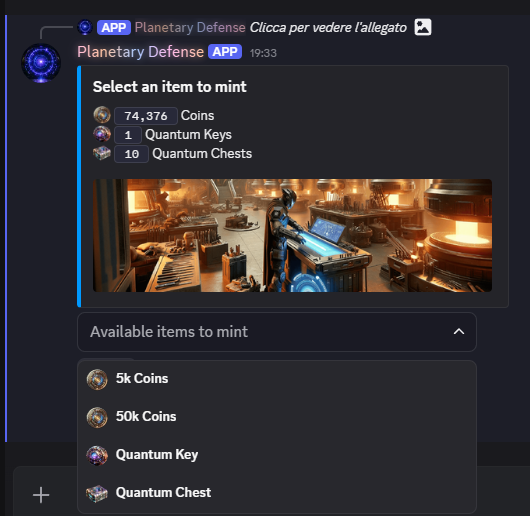
Available items to mint lists everything you can currently mint. Quantum Keys cost 8,000 Coins each, Quantum Chests cost 5,000 Coins each, Fragments cost 10,000 Coins each; Coins themselves have no fixed per-unit cost and can be minted in batch starting at 5,000, rising to 50,000, and up to 500,000 Coins.
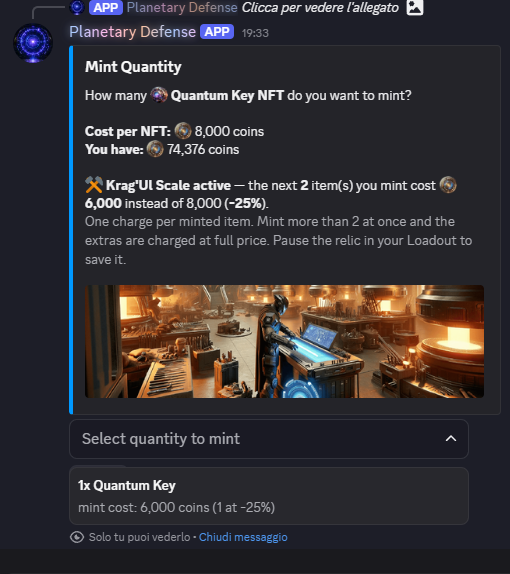
Picking an item opens Mint Quantity, where you set how many NFTs to create — in this example, a Quantum Key. Minting means creating that item's NFT on the WAX blockchain and sending it straight to your connected wallet.
If you have an active Altar Relic that discounts minting, such as Krag'Ul Scale, it's applied automatically here: in this example it cuts the cost of the next 2 items minted from 8,000 to 6,000 Coins each (a 25% discount). The Relic spends one charge per item minted, so minting more than its remaining charges means the extra items are charged at full price; you can pause the Relic in your Loadout if you'd rather save its charges for later.
Selecting a quantity shows the total mint cost before you confirm — in this example, minting 1 Quantum Key at the discounted price comes to 6,000 Coins.
{% hint style="info" %}
The maximum number of mints is 10 items at a time in a single transaction.
{% endhint %}
Confirm Mint gives you one last summary — the item and quantity, the total coin cost, your current balance, and the WAX address the NFT will be sent to — before you commit.
Once confirmed, Mint Successful confirms the transaction went through, and gives you shortcuts to view your NFTs or the transaction itself.
{% hint style="info" %}
Note: The information on this page reflects the current state of Planetary Defense's development. As new features are actually released and the game evolves, some details here may change, and this page will be updated to stay accurate.
{% endhint %}
---
# Agent Instructions
This documentation is published with GitBook. GitBook is the documentation platform designed so that both humans and AI agents can read, navigate, and reason over technical content effectively. Learn more at gitbook.com.
## Querying This Documentation
If you need additional information that is not directly available in this page, you can query the documentation by asking a question.
Perform an HTTP GET request on the following URL with the `ask` and `goal` query parameters:
```
GET https://planetary-defense-guide.gitbook.io/guide/discord-game/mint.md?ask=&goal=
```
`ask` is the immediate question: it should be specific, self-contained, and written in natural language.
`goal` is what the user is ultimately trying to achieve, the reason they need the answer. Sharing it helps GitBook give you a better, more relevant answer. A goal is most helpful when it describes the outcome the user wants rather than restating the question. For example, with `ask=how do I create an API token`, a goal like `automate deployments from our CI pipeline` lets GitBook tailor the answer to that use case.
The response will contain a direct answer to the question and relevant excerpts and sources from the documentation.
Use this mechanism when the answer is not explicitly present in the current page, you need clarification or additional context, or you want to retrieve related documentation sections.