> For the complete documentation index, see [llms.txt](https://planetary-defense-guide.gitbook.io/guide/llms.txt). Markdown versions of documentation pages are available by appending `.md` to page URLs; this page is available as [Markdown](https://planetary-defense-guide.gitbook.io/guide/discord-game/alerts.md).
# Alerts
Choose which in-game moments the bot DMs you about.
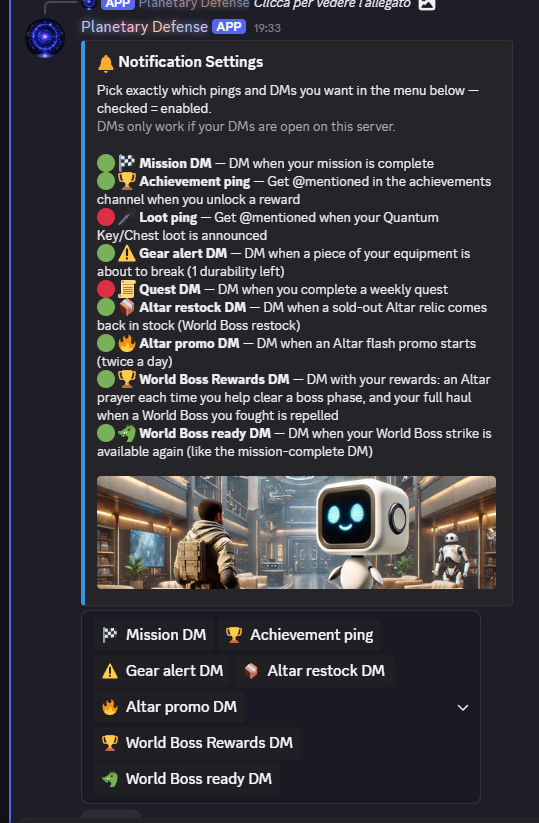
Clicking the bell icon opens the Notification Settings menu. Alerts are messages the bot sends you as a DM (Direct Message) on your Discord profile — they make playing easier by reminding you of important events, such as a mission finishing, a Boss being defeated, or earning a Prayer, along with other useful information.
There are nine alerts to choose from:
* Mission DM — notifies you when your mission is complete
* Achievement ping — @mentions you in the achievements channel when you unlock a reward
* Loot ping — @mentions you when your Quantum Key, Quantum Chest or Fragment loot is announced
* Gear alert DM — warns you when a piece of your equipment is about to break, at 1 durability left
* Quest DM — notifies you when you complete a weekly quest
* Altar restock DM — notifies you when a sold-out Altar Relic comes back in stock
* Altar promo DM — notifies you when an Altar flash promo starts, twice a day
* World Boss Rewards DM — sends you a notification each time you help clear a Boss phase or when a World Boss you fought is repelled
* World Boss ready DM — notifies you when your World Boss strike is available again, just like the mission-complete DM
Keep in mind DMs only work if your DMs are open on this server.
The colored dot next to each alert shows whether it's currently active: green means the alert is on, red means it's off.
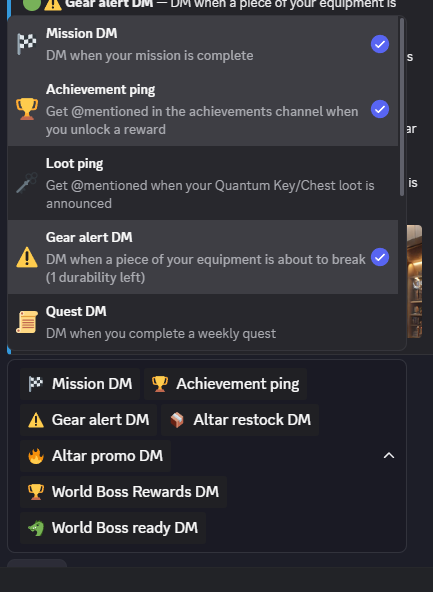
To turn an alert on, click the dropdown arrow and select the alert you need from the menu that appears. Once enabled, a blue checkmark appears next to it, and you'll start receiving DMs from the bot for that alert.
{% hint style="info" %}
Note: The information on this page reflects the current state of Planetary Defense's development. As new features are actually released and the game evolves, some details here may change, and this page will be updated to stay accurate.
{% endhint %}
---
# Agent Instructions
This documentation is published with GitBook. GitBook is the documentation platform designed so that both humans and AI agents can read, navigate, and reason over technical content effectively. Learn more at gitbook.com.
## Querying This Documentation
If you need additional information that is not directly available in this page, you can query the documentation by asking a question.
Perform an HTTP GET request on the following URL with the `ask` and `goal` query parameters:
```
GET https://planetary-defense-guide.gitbook.io/guide/discord-game/alerts.md?ask=&goal=
```
`ask` is the immediate question: it should be specific, self-contained, and written in natural language.
`goal` is what the user is ultimately trying to achieve, the reason they need the answer. Sharing it helps GitBook give you a better, more relevant answer. A goal is most helpful when it describes the outcome the user wants rather than restating the question. For example, with `ask=how do I create an API token`, a goal like `automate deployments from our CI pipeline` lets GitBook tailor the answer to that use case.
The response will contain a direct answer to the question and relevant excerpts and sources from the documentation.
Use this mechanism when the answer is not explicitly present in the current page, you need clarification or additional context, or you want to retrieve related documentation sections.